Google Business Profile Suspended: Pharmacy Reinstatement
RevealSite Team
November 17, 2026 · 9 min read
Key Takeaways
✓Stop editing the profile and read Google's suspension notice before you contact anyone.
✓Audit your name, address, phone, hours, and website against your storefront sign and state license.
✓Gather at least five proof items: pharmacy license, business document, exterior photo, interior photo, and website contact page.
✓File one reinstatement request, since repeat submissions can slow the review.
✓Plan for days or longer, because Google publishes no fixed turnaround for decisions.
✓Remember that 42% of local searchers click a Maps pack result, so every week offline costs calls.
You open Google Maps to check your pharmacy's listing and it's gone. Your phone has been quiet since Tuesday. A Google Business Profile suspended without warning can cost an independent pharmacy its overnight, and the fix is rarely as simple as clicking an appeal button.
Build the presence your community trusts
Let us be your first step. Get in touch with our team today.
The good news is that most suspensions trace back to a handful of fixable problems. This guide covers what a suspension means, why pharmacies trigger them, and how to file a reinstatement request that gives Google what it needs to say yes.
What Does It Mean When Google Suspends a Pharmacy Profile?
A suspension means Google found a policy or verification problem and took away your control of the profile, or removed it from Search and Maps entirely. Either way, patients searching for a pharmacy nearby can't reach you the way they did last week.
Google doesn't use the terms, but local SEO practitioners usually describe two patterns. A "soft" suspension strips your dashboard access while the listing may still appear. A "hard" suspension pulls the listing out of results. Google explains the underlying states in its help page on fixing suspended or disabled profiles.
What you see
What it usually means
Your first move
Dashboard says suspended, listing still shows
You lost control of the profile, but the public listing may still appear with old details
Read the notice, then audit every field against your storefront
Listing gone from Search and Maps
Google removed the profile, so calls, directions, and visible reviews stop
Collect proof documents before you file anything
Verification stuck or repeatedly failing
Google can't confirm the business is real at that address
Fix the address or name problem, then retry verification
Why does it hurt so much? According to Backlinko's local SEO statistics, 42% of local searchers click a result inside the Google Maps pack. A Semrush roundup of local SEO data, citing SOCi, reports that businesses in the local 3-pack get 126% more traffic and 93% more calls, clicks, and direction requests than positions 4 through 10.
Picture a pharmacy that fields 40 calls a week from Maps. If the listing disappears for three weeks, those calls go to the chain store down the road. And according to Invoca's healthcare marketing statistics, 88% of healthcare appointments are scheduled by phone, so lost calls are lost patients.
Why Was Your Google Business Profile Suspended?
Google usually suspends a profile for one of a few reasons: the address or business name breaks its representation rules, the business can't be verified, the content violates a policy, or a major edit looked suspicious. Pharmacies hit the same snags again and again.
Read the suspension notice closely before you change anything on the profile.
Start by comparing your profile to Google's published guidelines for representing your business. Then check the list below, because the cause is usually on it.
A name stuffed with keywords. "Main Street Pharmacy | Compounding | Flu Shots | Near Me" won't match your storefront sign. Google expects the real-world name.
An ineligible address. P.O. boxes, mailbox stores, and virtual offices don't qualify. Neither does a suite shared with an unrelated business if customers can't actually find you there.
No customer-facing location. A mail-order or compounding operation with no staffed storefront and posted hours can fall outside Google's rules, which expect in-person service at the listed address.
Heavy edits to sensitive fields. Changing your name, address, and category in one sitting can trigger a review, especially soon after verification.
Duplicate or conflicting listings. An old profile from a prior owner or a previous address can collide with your current one.
Content problems. Posts, photos, or services that touch regulated products can run into Google's content rules. The guide to GBP posts for pharmacies explains what's restricted.
Reports from others. A competitor or an unhappy customer can flag your listing, which sometimes sets off an automated check.
Be honest with yourself here. Most owners can name the likely cause in about five minutes once they look at the profile as Google's reviewer would.
Not sure what triggered the suspension?
RevealSite builds and manages Google Business Profiles for independent pharmacies, so a profile audit is a normal part of the work.
What Should You Do Right After the Suspension Notice?
Stop editing the profile, read the notice, and audit every detail against your real storefront before you contact Google. Rushing a request with the wrong fix wastes your chance and can lengthen the process.
That first hour matters more than owners expect. Here's the order that works.
Freeze edits. Don't change the name, hours, or category again while you diagnose the problem.
Don't create a new profile. A duplicate listing for the same pharmacy usually makes the situation worse, not better.
Read the email and dashboard message. Note the exact wording Google used. It often points to the field in question.
Audit your details. Match your business name, address, phone, hours, and website to your storefront sign and your state license. Our guide to pharmacy Google Business Profile attributes covers the fields that matter most.
Fix the cause on your side. If your website lists a different address than your profile, correct the website first.
Consistency is the whole game. If your sign says one thing, your website another, and your profile a third, Google can't verify which one is real.
Your website is part of that picture. Google's SEO starter guide explains how Google reads site content, which helps you spot contact details that conflict with your profile.
Also ask whoever touches your listings, whether that's a staff member, a website vendor, or a marketing agency, what they changed in the last 30 days. Plenty of suspensions follow a well-meant cleanup, like shortening the business name or switching the primary category.
How Do You Submit a Reinstatement Request and What Proof Helps?
You submit a reinstatement request through Google's Business Profile help flow, linked from the suspended profile help page, and you back it with documents that prove your pharmacy is real, open, and located where you say it is. Accurate evidence beats long explanations.
Google decides what it accepts, so treat this list as a strong starting set rather than a checklist with a promised outcome.
Documents worth gathering
Your state board of pharmacy license or permit showing the business name and address.
A business license, tax document, or utility bill that carries the same name and address.
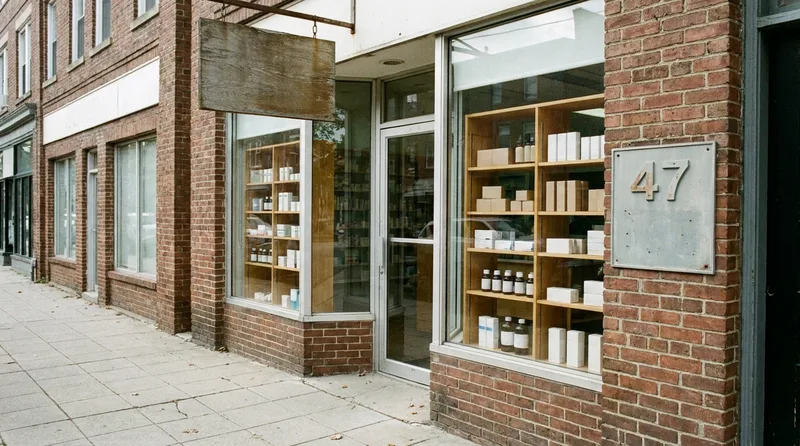
Clear photos of the exterior with your sign and street number visible.
Interior photos of the pharmacy counter, shelves, and waiting area. Our
A screenshot of your website's contact page showing matching details.
A clean storefront photo with your sign in frame supports your request.
The submission steps
Confirm the profile details are accurate and match your documents.
Open the suspended profile's help flow and choose the reinstatement option.
Enter your business name, address, and website exactly as they appear on your sign and license.
Upload your documents and photos, keeping files clear and readable.
Submit once. Repeat submissions can slow the review.
Keep your explanation short and factual. State what the pharmacy is, where it is, and what you corrected. Skip the frustration, even if you've earned it.
One pharmacy-specific tip: if your store sits inside a medical building or shopping center, include your suite number and a photo of the door or directory sign. Reviewers can't verify an address they can't picture.
Want a second set of eyes before you file?
RevealSite can review your profile, documents, and website details so your request gives Google a consistent picture of your pharmacy.
What Happens if Google Denies the Request or Takes Weeks?
Google doesn't publish a fixed turnaround, so plan for days and sometimes longer, and expect an email with the decision. If it's denied, the message usually hints at what didn't check out, and you can correct that gap and apply again.
While you wait, keep patients informed through channels you control. A pharmacy that loses its listing shouldn't also lose its refill customers.
Confirm your hours and address on your website's contact page and homepage.
Post a short notice on your Facebook page so regular patients know you're open.
Have your team give the address and hours to callers who say they couldn't find you online.
If the request fails twice, look closer at eligibility. A pharmacy without a staffed storefront may need to rethink how it appears on Google, because the rules for service-area businesses differ from storefront rules. No one can promise a reinstatement, and anyone who does is selling something.
Once your profile comes back, rebuilding matters. Reviews may take time to reappear, so restart a steady request routine using our system for getting more pharmacy reviews. According to the BrightLocal Local Consumer Review Survey, 85% of consumers used Google to find reviews for local businesses, so visible reviews carry real weight.
How Do You Avoid Having Your Google Business Profile Suspended Again?
You avoid a repeat by treating the profile as a regulated asset: keep the name, address, and category accurate, make edits one at a time, and audit the listing on a schedule. Prevention costs far less than a three-week outage.
If you want a broader primer on how local listings work, HubSpot's local SEO guide covers the basics.
A monthly consistency check takes under an hour and prevents repeat suspensions.
Here's a routine that RevealSite uses with independent pharmacies, and it takes under an hour a month.
Check name, address, phone, hours, and website for consistency across your site and major directories.
Make only one sensitive change at a time and wait before making the next.
Limit who has owner or manager access, and remove former staff and old agencies.
Review posts and photos against Google's content rules before publishing.
Watch for unfamiliar edits, since third parties can suggest changes to your listing.
Fix the cause before you file, send one clean request, and protect the profile once it's back. A Google Business Profile suspended for a fixable problem is a setback, not the end of your local visibility.
Start today with a ten-minute audit: compare your sign, license, website, and profile line by line. That single step answers most of the questions Google's reviewers will ask.
Get your pharmacy's profile back on solid ground
RevealSite helps independent pharmacies audit, repair, and protect their Google presence. Talk to our team about your suspended or at-risk listing.
What does a Google Business Profile suspended notice mean?▼
It means Google found a policy or verification problem with your listing. You may lose dashboard control, or the listing may disappear from Search and Maps. The notice usually names the issue, so read it closely before you change anything.
How long does it take to reinstate a suspended Google Business Profile?▼
Google doesn't publish a fixed turnaround. Plan for several days at minimum, and longer if the team asks for more documents. You'll receive the decision by email, so avoid resubmitting while you wait, because repeat requests can slow the review.
Can a pharmacy create a new profile if the old one is suspended?▼
No, creating a duplicate listing for the same pharmacy usually makes the problem worse. Google can flag the new profile as a conflict. Fix the cause on the original profile, submit a reinstatement request, and let Google review that listing.
What proof helps a pharmacy get reinstated?▼
Start with your state pharmacy license or permit, a utility bill or business document showing your name and address, and clear storefront and interior photos. Matching details on your website's contact page also help the reviewer confirm the pharmacy is real.
Can a competitor get my pharmacy's profile suspended?▼
A competitor or customer can report your listing or suggest edits, and that can sometimes trigger a check. A genuine, accurate profile usually holds up. Monitor your listing for unfamiliar changes and keep your documents handy so you can respond quickly.
Will my reviews come back after my Google Business Profile is reinstated?▼
Reviews tied to the profile generally return once the listing is visible again, though it can take time. Restart a steady review request routine right away, since a recent flow of Google reviews supports your credibility with patients and with Google.
Is a mail-order pharmacy eligible for a Google Business Profile?▼
It depends on how you serve customers. Google's guidelines expect in-person contact at the listed address during stated hours, and service-area rules differ from storefront rules. Review Google's guidelines before you list an address that patients can't visit.